

Online MS-102 Test Brain Dump Question and Test Engine
Real Microsoft MS-102 Exam Dumps with Correct 402 Questions and Answers
NEW QUESTION # 238
You have a Microsoft 365 E5 tenant that contains a user named User1.
You plan to implement insider risk management.
You need to ensure that User1 can perform the following tasks:
Review alerts.
Manage cases.
Create notice templates.
Review user emails by using Content explorer.
The solution must use the principle of least privilege.
To which role group should you add User1?
- A. Insider Risk Management
- B. Insider Risk Management Admin
- C. Insider Risk Management Investigators
- D. Insider Risk Management Analysts
Answer: C
Explanation:
Reference:
https://docs.microsoft.com/en-us/microsoft-365/compliance/insider-risk-management-configure?view=o365-wor
NEW QUESTION # 239
You have a Microsoft Azure Active Directory (Azure AD) tenant named Contoso.com.
You create a Microsoft Defender for identity instance Contoso.
The tenant contains the users shown in the following table.
You need to modify the configuration of the Defender for identify sensors.
Solutions: You instruct User1 to modify the Defender for identity sensor configuration.
Does this meet the goal?
- A. Yes
- B. No
Answer: A
NEW QUESTION # 240
You have a Microsoft 365 E5 tenant that contains the devices shown in the following table.
The devices are managed by using Microsoft Intune.
You plan to use a configuration profile to assign the Delivery Optimization settings.
Which devices will support the settings?
- A. Device1 and Device4
- B. Device1, Device2, Device3, and Device4
- C. Device1, Device3, and Device4
- D. Device1 only
Answer: D
NEW QUESTION # 241
You have a Microsoft 365 E5 tenant that contains the devices shown in the following table.
You plan to implement attack surface reduction (ASR) rules. Which devices will support the ASR rules?
- A. Device1, Device2, Devices and Device4
- B. Device 1, Device2, and Device3 only
- C. Device3 only
- D. Device2 and Device3 only
Answer: D
Explanation:
Reference:
https://docs.microsoft.com/en-us/microsoft-365/security/defender-endpoint/enable-attack-surface-reduction?view
NEW QUESTION # 242
You have a Microsoft 365 E5 subscription that uses Azure Advanced Threat Protection (ATP).
You need to create a detection exclusion in Azure ATP.
Which tool should you use?
- A. the Cloud App Security portal
- B. the Microsoft 365 admin center
- C. the Azure Advanced Threat Protection portal
- D. Microsoft Defender Security Center
- E. the Security & Compliance admin center
Answer: C
Explanation:
Reference:
https://docs.microsoft.com/en-us/defender-for-identity/what-is
https://docs.microsoft.com/en-us/defender-for-identity/excluding-entities-from-detections
NEW QUESTION # 243
You need to notify the manager of the human resources department when a user in the department shares a file or folder from the departments Microsoft SharePoint Online site. What should you do?
- A. From the SharePoint Online admin center, modify the sharing settings.
- B. From the SharePoint Online site, create an alert.
- C. From the Microsoft 365 Defender portal, create an alert policy.
- D. From the Microsoft Purview compliance portal, create a data loss prevention (DLP) policy.
Answer: D
NEW QUESTION # 244
You have a Microsoft 365 subscription that contains the users shown in the following table.
You have the named locations shown in the following table.
You create a conditional access policy that has the following configurations:
* Users or workload identities:
o Include: Group1
o Exclude: Group2
* Cloud apps or actions: Include all cloud apps
* Conditions:
o Include: Any location
o Exclude: Montreal
* Access control: Grant access, Require multi-factor authentication
User1 is on the multi-factor authentication (MFA) blocked users list.
For each of the following statements, select Yes if the statement is true. Otherwise, select No.
NOTE: Each correct selection is worth one point.
Answer:
Explanation:
Explanation
NEW QUESTION # 245
HOTSPOT
You have a Microsoft 365 tenant.
You create a retention label as shown in the Retention Label exhibit. (Click the Retention Label tab.)
You create a label policy as shown in the Label Policy exhibit. (Click the Label Policy tab.)
The label policy is configured as shown in the following table.
For each of the following statements, select Yes if the statement is true. Otherwise, select No.
NOTE: Each correct selection is worth one point.
Answer:
Explanation:
Explanation
Box 1: No
Box 2: Yes
Box 3: No
Reference:
https://docs.microsoft.com/en-us/office365/securitycompliance/retention-policies
NEW QUESTION # 246
From the Microsoft 365 compliance center, you configure a data loss prevention (DLP) policy for a Microsoft SharePoint Online site named Site1. Site1 contains the roles shown in the following table.
Prvi creates the files shown in the exhibit. (Click the Exhibit tab.)
Which files can User1 and User2 open? To answer, select the appropriate options in the answer area.
NOTE: Each correct selection is worth one point.
Answer:
Explanation:
Explanation
Graphical user interface, text, application, email Description automatically generated
Reference:
https://sharepointmaven.com/4-security-roles-of-a-sharepoint-site/
https://gcc.microsoftcrmportals.com/blogs/office365-news/190220SPIcons/
NEW QUESTION # 247
You have a Microsoft 365 E5 subscription that uses Microsoft Defender for Cloud Apps.
You need to create a policy that will generate an email alert when a banned app is detected requesting permission to access user information or data in the subscription.
What should you configure? To answer, select the appropriate options in the answer area.
NOTE: Each correct selection is worth one point.
Answer:
Explanation: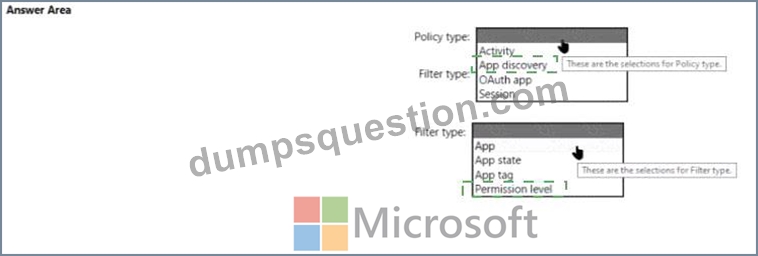
Explanation
NEW QUESTION # 248
You have an Azure subscription and an on-premises Active Directory domain. The domain contains 50 computers that run Windows 10.
You need to centrally monitor System log events from the computers.
What should you do? To answer, select the appropriate options in the answer area.
NOTE: Each correct selection is worth one point.
Answer:
Explanation:
Explanation
Reference:
https://docs.microsoft.com/en-us/azure/azure-monitor/learn/quick-collect-windows-computer
NEW QUESTION # 249
You have a Microsoft 365 E5 subscription.
You define a retention label that has the following settings:
* Retention period 7 years
* Start the retention period bated on: When items were created
You need to prevent the removal of the label once the label K applied to a lie What should you select in the retention label settings?
- A. Mark items as a record
- B. Mark items as a regulatory record
- C. Retain items even If users delete
- D. Retain items forever
Answer: A
NEW QUESTION # 250
You have a Microsoft 365 subscription that contains the alerts shown in the following table.
Which properties of the alerts can you modify?
- A. Status only
- B. Status, Severity, and Comment only
- C. Status and Severity only
- D. Status, Severity, Comment and Category
- E. Status and Comment only
Answer: E
Explanation:
Reference:
https://docs.microsoft.com/en-us/microsoft-365/security/defender-endpoint/update-alert?view=o365-worldwide#
NEW QUESTION # 251
You have a Microsoft 365 E5 tenant.
You create an auto-labeling policy to encrypt emails that contain a sensitive info type. You specify the locations where the policy will be applied.
You need to deploy the policy.
What should you do first?
- A. Turn on the policy
- B. Configure Azure Information Protection analytics
- C. Review the sensitive information in Activity explorer
- D. Run the policy in simulation mode
Answer: D
Explanation:
Reference:
https://docs.microsoft.com/en-us/microsoft-365/compliance/apply-sensitivity-label-automatically?view=o365-wo
NEW QUESTION # 252
As of March, how long will the computers in each office remain supported by Microsoft? To answer, select the appropriate options in the answer area.
NOTE: Each correct selection is worth one point.
Answer:
Explanation:
Explanation
https://support.microsoft.com/en-gb/help/13853/windows-lifecycle-fact-sheet March Feature Updates:
Serviced for 18 months from release date September Feature Updates: Serviced for 30 months from release date References:
https://www.windowscentral.com/whats-difference-between-quality-updates-and-feature-updates-windows-10
NEW QUESTION # 253
You have three devices enrolled in Microsoft Endpoint Manager as shown in the following table.
The device compliance policies in Endpoint Manager are configured as shown in the following table.
The device compliance policies have the assignments shown in the following table.
For each of the following statements, select Yes if the statement is true. Otherwise, select No. NOTE: Each correct selection is worth one point.
Answer:
Explanation: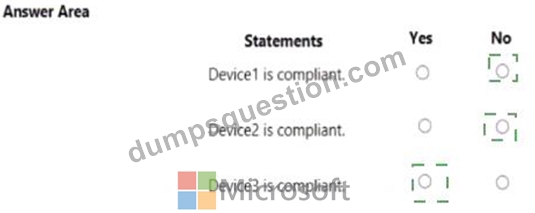
Explanation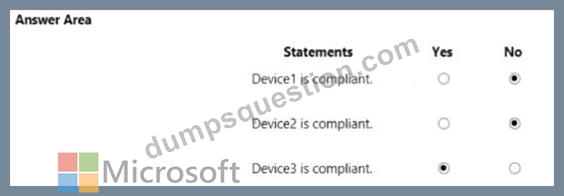
NEW QUESTION # 254
You have a Microsoft 365 E5 subscription.
You plan to implement Microsoft Purview policies to meet the following requirements:
Identify documents that are stored in Microsoft Teams and SharePoint that contain Personally Identifiable Information (PII).
Report on shared documents that contain PII.
What should you create?
- A. an alert policy
- B. a retention policy
- C. a data loss prevention (DLP) policy
- D. a Microsoft Defender for Cloud Apps policy
Answer: C
Explanation:
Explanation
Demonstrate data protection
Protection of personal information in Microsoft 365 includes using data loss prevention (DLP) capabilities.
With DLP policies, you can automatically protect sensitive information across Microsoft 365.
There are multiple ways you can apply the protection. Educating and raising awareness to where EU resident data is stored in your environment and how your employees are permitted to handle it represents one level of information protection using Office 365 DLP.
In this phase, you create a new DLP policy and demonstrate how it gets applied to the IBANs.docx file you stored in SharePoint Online in Phase 2 and when you attempt to send an email containing IBANs.
From the Security & Compliance tab of your browser, click Home.
Click Data loss prevention > Policy.
Click + Create a policy.
In Start with a template or create a custom policy, click Custom > Custom policy > Next.
In Name your policy, provide the following details and then click Next: a. Name: EU Citizen PII Policy b. Description: Protect the personally identifiable information of European citizens Etc.
Reference:
https://learn.microsoft.com/en-us/compliance/regulatory/gdpr-discovery-protection-reporting-in-office365-dev-te
NEW QUESTION # 255
DRAG DROP
You have a Microsoft 365 E5 subscription that contains two groups named Group1 and Group2.
You need to ensure that each group can perform the tasks shown in the following table.
The solution must use the principle of least privilege.
Which role should you assign to each group? To answer, drag the appropriate roles to the correct groups. Each role may be used once, more than once, or not at all. You may need to drag the split bar between panes or scroll to view content.
NOTE: Each correct selection is worth one point.
Answer:
Explanation:
Explanation
Box 1: Billing admin
manage service request
Purchase new services
Etc.
Assign the Billing admin role to users who make purchases, manage subscriptions and service requests, and monitor service health.
Box 2: User admin
User admin
Assign the User admin role to users who need to do the following for all users:
- Add users and groups
- Assign licenses
- Manage most users properties
- Create and manage user views
- Update password expiration policies
- Manage service requests
- Monitor service health
Reference:
https://learn.microsoft.com/en-us/microsoft-365/admin/add-users/about-admin-roles
NEW QUESTION # 256
You have a Microsoft 365 subscription.
You have the retention policies shown in the following table.
Both policies are applied to a Microsoft SharePoint site named Site1 that contains a file named File1.docx.
File1.docx was created on January 1, 2022 and last modified on January 31,2022. The file was NOT modified again.
When will File1.docx be deleted automatically?
- A. January 31, 2023
- B. January 31, 2024
- C. January 1,2024
- D. never
- E. January 1,2023
Answer: B
Explanation:
Explanation
Retention wins over deletion.
Note:
Explanation for the four different principles:
1. Retention wins over deletion. Content won't be permanently deleted when it also has retention settings to retain it. While this principle ensures that content is preserved for compliance reasons, the delete process can still be initiated (user-initiated or system-initiated) and consequently, might remove the content from users' main view. However, permanent deletion is suspended.
2. Etc.
Reference:
https://learn.microsoft.com/en-us/microsoft-365/compliance/retention
NEW QUESTION # 257
You have a Microsoft 365 subscription.
In the Exchange admin center, you have a data loss prevention (DLP) policy named Policy1 that has the following configurations:
Block emails that contain financial data.
Display the following policy tip text: Message blocked.
From the Security & Compliance admin center, you create a DLP policy named Policy2 that has the following configurations:
Use the following location: Exchange email.
Display the following policy tip text: Message contains sensitive data.
When a user sends an email, notify the user if the email contains health records.
What is the result of the DLP policies when the user sends an email? To answer, drag the appropriate results to the correct scenarios. Each result may be used once, more than once, or not at all. You may need to drag the split bar between panes or scroll to view content.
NOTE: Each correct selection is worth one point.
Answer:
Explanation:
Explanation
Box 1: The email will be blocked, and the user will receive the policy tip: Message blocked.
If you've created DLP policies in the Exchange admin center, those policies will continue to work side by side with any policies for email that you create in the Security & Compliance Center. But note that rules created in the Exchange admin center take precedence. All Exchange mail flow rules are processed first, and then the DLP rules from the Security & Compliance Center are processed.
Box 2: The email will be allowed, and the user will receive the policy tip: Message contains sensitive data.
Reference:
https://docs.microsoft.com/en-us/microsoft-365/compliance/how-dlp-works-between-admin-centers
NEW QUESTION # 258
You have a Microsoft 365 E5 tenant that contains the users shown in the following table.
You perform the following actions:
* Provision the private store in Microsoft Store for Business.
* Add an app named App1 to the private store.
* Set Private store availability for App1 to Specific groups, and then select Group3.
For each of the following statements, select Yes if the statement is true. Otherwise, select No.
NOTE: Each correct selection is worth one point.
Answer:
Explanation:
Explanation
Text Description automatically generated
Reference:
https://docs.microsoft.com/en-us/microsoft-store/app-inventory-management-microsoft-store-for-business#priva
NEW QUESTION # 259
You have a Microsoft 365 E5 subscription that contains the users shown in the following table.
Which users can review the Adoption Score in the Microsoft 365 admin center?
- A. User1, User2. and User3
- B. User! and User3 only
- C. User1 and User2 only
- D. User! only
- E. User2onry
Answer: A
NEW QUESTION # 260
You have a hybrid Azure Active Directory (Azure AD) tenant and a Microsoft Endpoint Configuration Manager deployment.
You have the devices shown in the following table.
You plan to enable co-management.
You need to identify which devices support co-management without requiring the installation of additional software.
Which devices should you identify?
- A. Device3 only
- B. Device1, Device2, and Device3
- C. Device2 and Device3 only
- D. Device1 only
- E. Device2 only
Answer: C
NEW QUESTION # 261
Note: This question is part of a series of questions that present the same scenario. Each question in the series contains a unique solution that might meet the stated goals. Some question sets might have more than one correct solution, while others might not have a correct solution.
After you answer a question in this section, you will NOT be able to return to it. As a result, these questions will not appear in the review screen.
Your network contains an Active Directory domain.
You deploy an Azure AD tenant.
Another administrator configures the domain to synchronize to Azure AD.
You discover that 10 user accounts in an organizational unit (OU) are NOT synchronized to Azure AD. All the other user accounts synchronized successfully.
You review Azure AD Connect Health and discover that all the user account synchronizations completed successfully.
You need to ensure that the 10 user accounts are synchronized to Azure AD.
Solution: From Azure AD Connect, you modify the Azure AD credentials.
Does this meet the goal?
- A. Yes
- B. No
Answer: B
Explanation:
Explanation
The question states that "all the user account synchronizations completed successfully". Therefore, the Azure AD credentials are configured correctly in Azure AD Connect. It is likely that the 10 user accounts are being excluded from the synchronization cycle by a filtering rule.
Reference:
https://docs.microsoft.com/en-us/azure/active-directory/hybrid/how-to-connect-sync-configure-filtering
NEW QUESTION # 262
......
Valid MS-102 Test Answers & Microsoft MS-102 Exam PDF: https://www.dumpsquestion.com/MS-102-exam-dumps-collection.html
Microsoft MS-102 Certification Real 2023 Mock Exam: https://drive.google.com/open?id=1tiKQyrnpoi_RiXxfrNhDqdrfZVYpMtly