

Practice Microsoft Azure Administrator Associate AZ-104 exam. Online Exam Practice Tests with detailed explanations! Pass AZ-104 with confidence!
AZ-104 - Microsoft Azure Administrator Practice Tests 2021 | DumpsQuestion
NEW QUESTION 85
You purchase a new Azure subscription named Subscription1.
You create a virtual machine named VM1 in Subscription1. VM1 is not protected by Azure Backup.
You need to protect VM1 by using Azure Backup. Backups must be created at 01:00 and stored for 30 days.
What should you do? To answer, select the appropriate options in the answer area.
NOTE: Each correct selection is worth one point.
Answer:
Explanation:
Explanation:
Box 1: A Recovery Services vault
A Recovery Services vault is an entity that stores all the backups and recovery points you create over time.
Box 2: A backup policy
What happens when I change my backup policy?
When a new policy is applied, schedule and retention of the new policy is followed.
References:
https://docs.microsoft.com/en-us/azure/backup/backup-configure-vault
https://docs.microsoft.com/en-us/azure/backup/backup-azure-backup-faq
NEW QUESTION 86
You have an Azure subscription that contains a virtual network named VNet1. VNet1 uses an IP address space of 10.0.0.0/16 and contains the subnets in the following table.
Subnet1 contains a virtual appliance named VM1 that operates as a router.
You create a routing table named RT1.
You need to route all inbound traffic to VNet1 through VM1.
How should you configure RT1? To answer, select the appropriate options in the answer area.
NOTE: Each correct selection is worth one point.
Answer:
Explanation:

Box1 : 10.0.0.0/16
Address prefix in networking refer to the destination IP address range. In this scenario, destination is Vnet1 , hence Address prefix will be the address space of Vnet1.
Box 2 : Virtual appliance
Next hop gets the next hop type and IP address of a packet from a specific VM and NIC. Knowing the next hop helps you determine if traffic is being directed to the intended destination, or whether the traffic is being sent nowhere Next Hop --> VM1 --> Virtual Appliance (You can specify IP address of VM 1 when configuring next hop as virtual appliance) Box 3 : GatewaySubnet In the scenario it is asked for all the inbound traffic to Vnet1. Inbound traffic is flowing through SubnetGW. You need to route all inbound traffic from the VPN gateway to VNet1 through VM1.So its traffic from Gateway subnet only.
Reference:
https://docs.microsoft.com/en-us/azure/virtual-network/manage-route-table#create-a-route-table
https://docs.microsoft.com/en-us/azure/network-watcher/network-watcher-next-hop-overview
NEW QUESTION 87
You have an Azure subscription named Subscription1 and an on-premises deployment of Microsoft System Center Service Manager.
Subscription1 contains a virtual machine named VM1.
You need to ensure that an alert is set in Service Manager when the amount of available memory on VM1 is below 10 percent.
What should you do first?
- A. Deploy the IT Service Management Connector (ITSM)
- B. Create a notification
- C. Deploy a function app
- D. Create an automation runbook
Answer: A
Explanation:
Section: Manage Azure identities and governance
Explanation:
The IT Service Management Connector (ITSMC) allows you to connect Azure and a supported IT Service Management (ITSM) product/service, such as the Microsoft System Center Service Manager.
With ITSMC, you can create work items in ITSM tool, based on your Azure alerts (metric alerts, Activity Log alerts and Log Analytics alerts).
Reference:
https://docs.microsoft.com/en-us/azure/azure-monitor/platform/itsmc-overview
NEW QUESTION 88
You have an Azure subscription that contains the public load balancers shown in the following table.
You plan to create six virtual machines and to load balancer requests to the virtual machines. Each load balancer will load balance three virtual machines.
You need to create the virtual machines for the planned solution.
How should you create the virtual machines? To answer, select the appropriate options in the answer area.
NOTE: Each correct selection is worth one point.
Answer:
Explanation:
Explanation
Box 1: be created in the same availability set or virtual machine scale set.
The Basic tier is quite restrictive. A load balancer is restricted to a single availability set, virtual machine scale set, or a single machine.
Box 2: be connected to the same virtual network
The Standard tier can span any virtual machine in a single virtual network, including blends of scale sets, availability sets, and machines.
References:
https://www.petri.com/comparing-basic-standard-azure-load-balancers
NEW QUESTION 89
You have an on-premises network that you plan to connect to Azure by using a site-to-site VPN.
In Azure, you have an Azure virtual network named VNet1 that uses an address space of 10.0.0.0/16. VNet1 contains a subnet named Subnet1 that uses an address space of 10.0.0.0/24.
You need to create a site-to-site VPN to Azure.
Which four actions should you perform in sequence? To answer, move the appropriate actions from the list of actions to the answer area and arrange them in the correct order.
NOTE: More than one order of answer choices is correct. You will receive credit for any of the correct orders you select.
Answer:
Explanation:
Explanation
Note: More than one order of answer choices is correct.
Creating a local gateway (a logical object that represents the on-premise router) can be done at step 1, step 2 or step 3. The other three steps must be done in order: create gateway subnet then create VPN gateway then create the VPN connection. The VPN connection is a connection between the VPN gateway and the Local gateway.
NEW QUESTION 90
You have an Azure subscription that contains several virtual machines and an Azure Log Analytics workspace named Workspace1. You create a log search query as shown in the following exhibit.
Use the drop-down menus to select the answer choice that completes each statement based on the information presented in the graphic.
NOTE: Each correct selection is worth one point.
Answer:
Explanation:
References:
https://docs.microsoft.com/en-us/azure/azure-monitor/log-query/log-query-overview
https://docs-analytics-eus.azurewebsites.net/queryLanguage/query_language_renderoperator.html
NEW QUESTION 91
You have peering configured as shown in the following exhibit.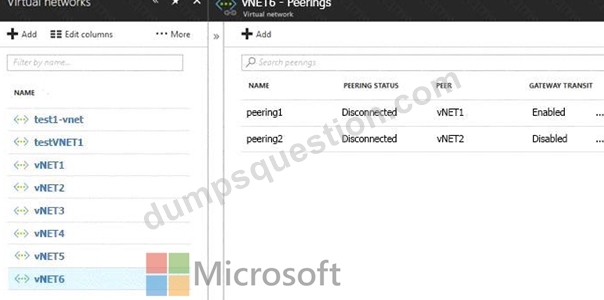
Use the drop-down menus to select the answer choice that completes each statement based on the information presented in the graphic.
NOTE: Each correct selection is worth one point.
Answer:
Explanation:
Explanation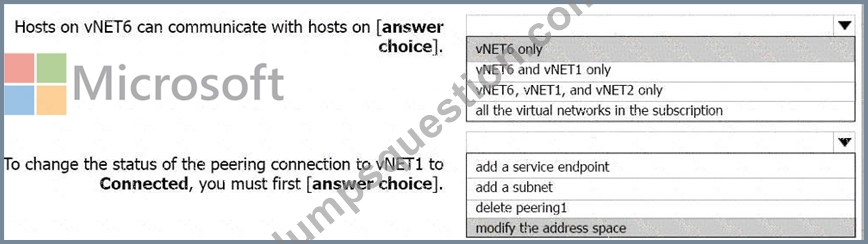
Box 1: vNET6 only
Box 2: Modify the address space
The virtual networks you peer must have non-overlapping IP address spaces.
References:
https://docs.microsoft.com/en-us/azure/virtual-network/virtual-network-manage-peering#requirements-and-const
NEW QUESTION 92
You have an Azure subscription that contains the following users in an Azure Active Directory tenant named contoso.onmicrosoft.com:
User1 creates a new Azure Active Directory tenant named external.contoso.onmicrosoft.com.
You need to create new user accounts in external.contoso.com.onmicrosoft.com.
Solution: You instruct User2 to create the user accounts.
- A. No
- B. Yes
Answer: B
Explanation:
Explanation
Only a global administrator can add users to this tenant.
References:
https://docs.microsoft.com/en-us/azure/devops/organizations/accounts/add-users-to-azure-ad
NEW QUESTION 93
You have an Azure subscription that contains the resources in the following table.
You install the Web Server server role (IIS) on VM1 and VM2, and then and VM1 and VM2 to LB1.
Answer:
Explanation:
NEW QUESTION 94
You need to recommend a solution to automate the configuration for the finance department users. The solution must meet the technical requirements.
What should you include in the recommended?
- A. Azure AD Identity Protection
- B. an Azure logic app and the Microsoft Identity Management (MIM) client
- C. Azure AP B2C
- D. dynamic groups and conditional access policies
Answer: D
Explanation:
Explanation
Scenario: Ensure Azure Multi-Factor Authentication (MFA) for the users in the finance department only.
The recommendation is to use conditional access policies that can then be targeted to groups of users, specific applications, or other conditions.
References:
https://docs.microsoft.com/en-us/azure/active-directory/authentication/howto-mfa-userstates
Topic 1, Litware, inc.
Overview
Litware, Ltd. is a consulting company that has a main office in Montreal and two branch offices in Seattle and New York.
The Montreal office has 2,000 employees. The Seattle office has 1,000 employees. The New York office has
200 employees.
All the resources used by Litware are hosted on-premises.
Litware creates a new Azure subscription. The Azure Active Directory (Azure AD) tenant uses a domain named Litware.onmicrosoft.com. The tenant uses the P1 pricing tier.
Existing Environment
The network contains an Active Directory forest named Litware.com. All domain controllers are configured as DNS servers and host the Litware.com DNS zone.
Litware has finance, human resources, sales, research, and information technology departments. Each department has an organizational unit (OU) that contains all the accounts of that respective department. All the user accounts have the department attribute set to their respective department. New users are added frequently.
Litware.com contains a user named User1.
All the offices connect by using private links.
Litware has data centers in the Montreal and Seattle offices. Each data center has a firewall that can be configured as a VPN device.
All infrastructure servers are virtualized. The virtualization environment contains the servers in the following table.
Litware uses two web applications named App1 and App2. Each instance on each web application requires
1GB of memory.
The Azure subscription contains the resources in the following table.
The network security team implements several network security groups (NSGs).
Planned Changes
Litware plans to implement the following changes:
* Deploy Azure ExpressRoute to the Montreal office.
* Migrate the virtual machines hosted on Server1 and Server2 to Azure.
* Synchronize on-premises Active Directory to Azure Active Directory (Azure AD).
* Migrate App1 and App2 to two Azure web apps named webApp1 and WebApp2.
Technical requirements
Litware must meet the following technical requirements:
* Ensure that WebApp1 can adjust the number of instances automatically based on the load and can scale up to five instance*.
* Ensure that VM3 can establish outbound connections over TCP port 8080 to the applications servers in the Montreal office.
* Ensure that routing information is exchanged automatically between Azure and the routers in the Montreal office.
* Enable Azure Multi-Factor Authentication (MFA) for the users in the finance department only.
* Ensure that webapp2.azurewebsites.net can be accessed by using the name app2.Litware.com.
* Connect the New Your office to VNet1 over the Internet by using an encrypted connection.
* Create a workflow to send an email message when the settings of VM4 are modified.
* Create a custom Azure role named Role1 that is based on the Reader role.
* Minimize costs whenever possible.
NEW QUESTION 95
You have an Azure App Service plan named AdatumASP1 that hosts several Azure web apps.
You discover that the web apps respond slowly.
You need to provide additional memory and CPU resources to each instance of the web apps.
What should you do?
- A. Scale out AdatumASP1
- B. Add continues WebJob that use the multi-instance scale
- C. Add a virtual machine scale set
- D. Scale up AdatumASP1
Answer: D
Explanation:
References:
https://github.com/MicrosoftDocs/azure-docs/blob/master/articles/app-service/web-sites-scale.md
Scale up : Correct Choice
Scale up: Get more CPU, memory, disk space, and extra features like dedicated virtual machines (VMs), custom domains and certificates, staging slots, autoscaling, and more. You scale up by changing the pricing tier of the App Service plan that your app belongs to.
Scale out : Incorrect Choice
Scale out: Increase the number of VM instances that run your app. You can scale out to as many as 30 instances, depending on your pricing tier. App Service Environments in Isolated tier further increases your scale-out count to 100 instances. For more information about scaling out, see Scale instance count manually or automatically.
Add continuous WebJobs : Incorrect Choice
WebJobs is a feature of Azure App Service that enables you to run a program or script in the same instance as a web app, API app, or mobile app. Add continuous WebJobs will Starts immediately when the WebJob is created. To keep the job from ending, the program or script typically does its work inside an endless loop. If the job does end, you can restart it.Starts only when triggered manually or on a schedule.
Add a virtual machine scale set : Incorrect Choice
A virtual machine scale set allows you to deploy and manage a set of identical, autoscaling virtual machines. You can scale the number of VMs in the scale set manually. You can also define rules to autoscale based on resource usage such as CPU, memory demand, or network traffic. It will not increase the slowness of the apps.
References:
https://docs.microsoft.com/en-us/azure/app-service/manage-scale-up
https://docs.microsoft.com/en-us/azure/app-service/webjobs-create#webjob-types
NEW QUESTION 96
You have an Azure subscription that contains the resources shown in the following table.
You need to configure a proximity placement group for VMSS1 Which proximity placement groups should you use?
- A. Proximity 1, Proximity2, and Proximity3
- B. Proximity 1 and Proximity3 only
- C. Proximity2 only
- D. Proximity1 only
Answer: B
NEW QUESTION 97
You have an Azure subscription named Subscription1.
In Subscription1, you create an Azure web app named WebApp1. WebApp1 will access an external service that requires certificate authentication.
You plan to require the use of HTTPS to access WebApp1.
You need to upload certificates to WebApp1.
In which formats should you upload the certificate? To answer, select the appropriate options in the answer area.
NOTE: Each correct selection is worth one point.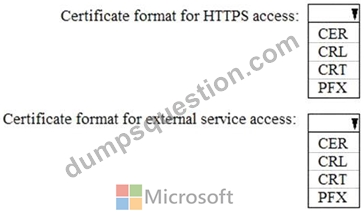
Answer:
Explanation:
Explanation
A PFX file contains the public key file (SSL Certificate) and its unique private key file. This is required for HTTPS access. The web app will distribute the public key (in a CER file) to clients that connect to the web app.
The CER file is an SSL Certificate which has the public key of the external service. The external service will have the private key associated with the public key contained in the CER file.
NEW QUESTION 98
You have the App Service plan shown in the following exhibit.
The scale-in settings for the App Service plan are configured as shown in the following exhibit.
The scale out rule is configured with the same duration and cool down tile as the scale in rule.
Use the drop-down menus to select the answer choice that completes each statement based on the information presented in the graphic.
Answer:
Explanation:
NEW QUESTION 99
You have an Azure subscription named Subscription1 that contains the quotas shown in the following table.
You deploy virtual machine to Subscription1 as shown in the following table.
You plan to deploy the virtual machines shown in the following table.
For each of the following statements, select Yes if the statement is true. Otherwise, select No.
Answer:
Explanation:
Reference:
https://docs.microsoft.com/en-us/azure/virtual-machines/windows/quotas
NEW QUESTION 100
You need to use Azure Automation State Configuration to manage the ongoing consistency of virtual machine configurations.
Which five actions should you perform in sequence? To answer, move the appropriate action from the list of actions to the answer area and arrange them in the correct order.
NOTE: More than one order of answer choices is correct. You will receive credit for any of the correct orders you select.
Answer:
Explanation:
Explanation
Step 1: Upload a configuration to Azure Automation State Configuration.
Import the configuration into the Automation account.
Step 2: Compile a configuration into a node configuration.
A DSC configuration defining that state must be compiled into one or more node configurations (MOF document), and placed on the Automation DSC Pull Server.
Step 3: Onboard the virtual machines to Azure Automation State Configuration.
Onboard the Azure VM for management with Azure Automation State Configuration Step 4: Assign the node configuration Step 5: Check the compliance status of the node Each time Azure Automation State Configuration performs a consistency check on a managed node, the node sends a status report back to the pull server. You can view these reports on the page for that node.
On the blade for an individual report, you can see the following status information for the corresponding consistency check:
The report status - whether the node is "Compliant", the configuration "Failed", or the node is "Not Compliant" References:
https://docs.microsoft.com/en-us/azure/automation/automation-dsc-getting-started
NEW QUESTION 101
You have an on-premises network that contains a Hyper-V host named Host1. Host1 runs Windows Server 2016 and hosts 10 virtual machines that run Windows Server 2016.
You plan to replicate the virtual machines to Azure by using Azure Site Recovery.
You create a Recovery Services vault named ASR1 and a Hyper-V site named Site1.
You need to add Host1 to ASR1.
What should you do?
- A. Download the installation file for the Azure Site Recovery Provider.
Download the vault registration key.
Install the Azure Site Recovery Provider on each virtual machine and register the virtual machines. - B. Download the installation file for the Azure Site Recovery Provider.
Download the vault registration key.
Install the Azure Site Recovery Provider on Host1 and register the server. - C. Download the installation file for the Azure Site Recovery Provider.
Download the storage account key.
Install the Azure Site Recovery Provider on Host1 and register the server. - D. Download the installation file for the Azure Site Recovery Provider.
Download the storage account key.
Install the Azure Site Recovery Provider on each virtual machine and register the virtual machines.
Answer: B
Explanation:
Below are the steps you need to perform in this scenario. Refer the link mentioned in the reference section.
Download the installation file for the Azure Site Recovery Provider
To set up the source environment, you create a Hyper-V site and add to that site the Hyper-V hosts containing VMs that you want to replicate. Then, you download and install the Azure Site Recovery Provider and the Azure Recovery Services agent on each host, and register the Hyper-V site in the vault.
Download the vault registration key
Download the Vault registration key. You need this when you install the Provider. The key is valid for five days after you generate it.
Install the Azure Site Recovery Provider on Host1.
Install the downloaded setup file (AzureSiteRecoveryProvider.exe) on each Hyper-V host that you want to add to the Hyper-V site. Setup installs the Azure Site Recovery Provider and Recovery Services agent on each Hyper-V host.
Register the server
In Registration, after the server is registered in the vault, select Finish.
References:
https://docs.microsoft.com/en-us/azure/site-recovery/hyper-v-azure-tutorial
NEW QUESTION 102
HOTSPOT
You have an Azure Active Directory (Azure AD) tenant that contains three global administrators named Admin1, Admin2, and Admin3.
The tenant is associated to an Azure subscription. Access control for the subscription is configured as shown in the Access control exhibit. (Click the Access Control tab.)
You sign in to the Azure portal as Admin1 and configure the tenant as shown in the Tenant exhibit. (Click the Tenant tab.)
For each of the following statements, select Yes if the statement is true. Otherwise, select No.
NOTE: Each correct selection is worth one point.
Hot Area:
Answer:
Explanation:
Section: [none]
Explanation:
Box 1: No
Only Admin3, the owner, can assign ownership.
Box 2: Yes
Box 3: No
Reference:
https://docs.microsoft.com/en-us/azure/cost-management-billing/manage/add-change-subscription- administrator
NEW QUESTION 103
You have an Azure subscription that contains 100 virtual machines.
You regularly create and delete virtual machines.
You need to identify unattached disks that can be deleted.
What should you do?
- A. From the Azure portal, configure the Advisor recommendations.
- B. From Microsoft Azure Storage Explorer, view the Account Management properties.
- C. From Azure Cost Management, create a Cost Management report.
Answer: B
Explanation:
Explanation
You can find unused disks in the Azure Storage Explorer console.Once you drill down to the Blob containers under a storage account, you can see the lease state of the residing VHD (the lease state determines if the VHD is being used by any resource) and the VM to which it is leased out. If you find that the lease state and the VM fields are blank, it means that the VHD in question is unused. The screenshot below shows two active VHDs being used by VMs as data and OS disks. The name of the VM and lease state are shown in the "VM Name" and "Lease State" columns, respectively.
e:
https://cloud.netapp.com/blog/reduce-azure-storage-costs
NEW QUESTION 104
You plan to deploy 20 Azure virtual machines by using an Azure Resource Manager template. The virtual machines will run the latest version of Windows Server 2016 Datacenter by using an Azure Marketplace image.
You need to complete the storageProfile section of the template.
How should you complete the storageProfile section? To answer, select the appropriate options in the answer area.
NOTE: Each correct selection is worth one point.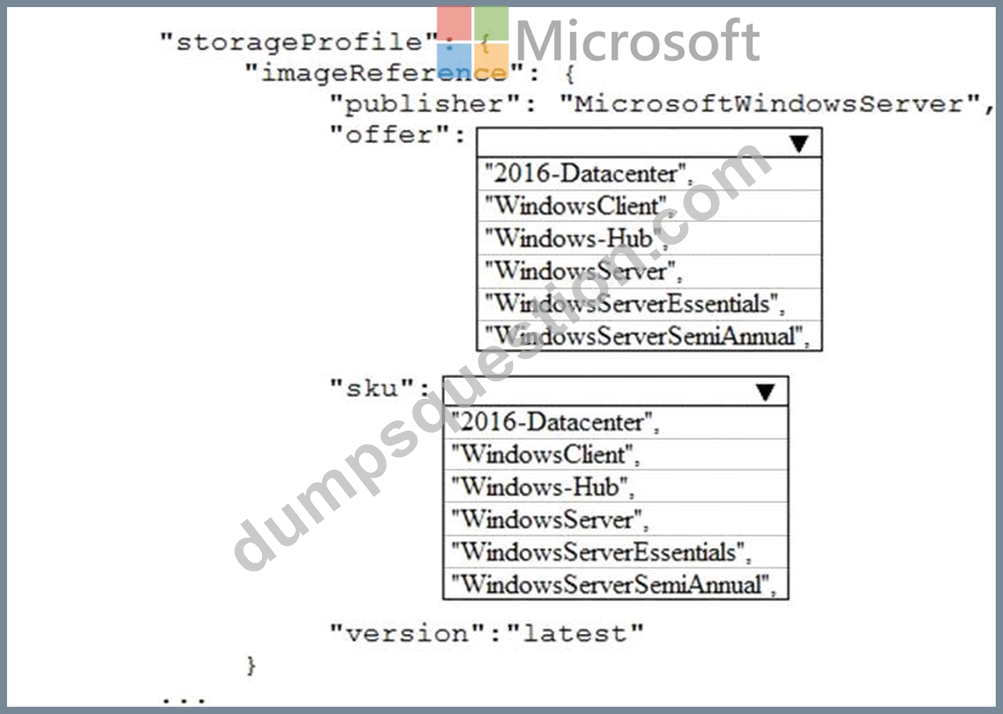
Answer:
Explanation:
Explanation
...
"storageProfile": {
"imageReference": {
"publisher": "MicrosoftWindowsServer",
"offer": "WindowsServer",
"sku": "2016-Datacenter",
"version": "latest"
},
...
References:
https://docs.microsoft.com/en-us/rest/api/compute/virtualmachines/createorupdate
NEW QUESTION 105
You have an on-premises server that contains a folder named D:\Folder1.
You need to copy the contents of D:\Folder1 to the public container in an Azure Storage account named contosodata.
Which command should you run?
https://contosodata.blob.core.windows.net/public
- A. snapshot
azcopy copy D:\folder1 https://contosodata.blob.core.windows.net/public -- - B. azcopy sync D:\folder1 https://contosodata.blob.core.windows.net/public --
- C. recursive
az storage blob copy start-batch D:\Folder1 https:// - D. contosodata.blob.core.windows.net/public
Answer: C
Explanation:
The azcopy copy command copies a directory (and all of the files in that directory) to a blob container. The result is a directory in the container by the same name.
Incorrect Answers:
B: The azcopy sync command replicates the source location to the destination location. However, the file is skipped if the last modified time in the destination is more recent.
D: The az storage blob copy start-batch command copies multiple blobs to a blob container.
Reference:
https://docs.microsoft.com/en-us/azure/storage/common/storage-use-azcopy-blobs
https://docs.microsoft.com/en-us/azure/storage/common/storage-ref-azcopy-copy
NEW QUESTION 106
You have an Azure subscription that contains the virtual machines shown in the following table.
You deploy a load balancer that has the following configurations:
* NameLB1
* Type: internal
* SKU: Standard
* Virtual network: VNET1
You need to ensure that you can add VM1 and VM2 to the backend pool of LB1.
Solution: You disassociate the public IP address from the network interface of VM2.
Does this meet the goal?
- A. No
- B. Yes
Answer: B
Explanation:
Explanation
You can only attach virtual machines in the same region and that have a standard SKU public IP configuration or no public IP configuration. All IP configurations must be on the same virtual network.
NEW QUESTION 107
You have an Azure subscription that contains a virtual network named VNet1. VNet 1 has two subnets named Subnet1 and Subnet2. VNet1 is in the West Europe Azure region.
The subscription contains the virtual machines in the following table.
You need to deploy an application gateway named AppGW1 to VNet1.
What should you do first?
- A. Move VM3 to Subnet1.
- B. Add a service endpoint.
- C. Stop VM1 and VM2.
- D. Add a virtual network.
Answer: C
Explanation:
Explanation
If you have an existing virtual network, either select an existing empty subnet or create a new subnet in your existing virtual network solely for use by the application gateway.
Verify that you have a working virtual network with a valid subnet. Make sure that no virtual machines or cloud deployments are using the subnet. The application gateway must be by itself in a virtual network subnet.
References:
https://social.msdn.microsoft.com/Forums/azure/en-US/b09367f9-5d01-4cda-9127-b7a506a0a151/cant-create-ap
https://docs.microsoft.com/en-us/azure/application-gateway/application-gateway-create-gateway
NEW QUESTION 108
......
Get instant access to AZ-104 practice exam questions: https://drive.google.com/open?id=1x7e-9T-SGrYvh3GAi0PCU73NjpblZ17g
The best AZ-104 exam study material and preparation tool is here: https://www.dumpsquestion.com/AZ-104-exam-dumps-collection.html