

Latest Fortinet FCP_FAZ_AN-7.4 Practice Test Questions, FCP - FortiAnalyzer 7.4 Analyst Exam Dumps
Feb-2025 Pass Fortinet FCP_FAZ_AN-7.4 Exam in First Attempt Easily
Fortinet FCP_FAZ_AN-7.4 Exam Syllabus Topics:
| Topic | Details |
|---|---|
| Topic 1 |
|
| Topic 2 |
|
| Topic 3 |
|
| Topic 4 |
|
| Topic 5 |
|
NEW QUESTION # 12
Refer to Exhibit: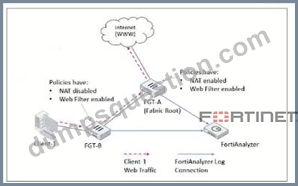
Client-1 is trying to access the internet for web browsing.
All FortiGate devices in the topology are part of a Security Fabric with logging to FortiAnalyzer configured. All firewall policies have logging enabled. All web filter profiles are configured to log only violations.
Which statement about the logging behavior for this specific traffic flow is true?
- A. Only FGT-A will create web filter logs if it detects a violation.
- B. Only FGT-B will create traffic logs.
- C. FGT B will create traffic logs and will create web filter logs if it detects a violation.
- D. FGT-B will see the MAC address of FGT-A as the destination and notifies FGT-A to log this flow.
Answer: C
Explanation:
The topology shows a Security Fabric setup involving FortiGate devices (FGT-A and FGT-B) and a FortiAnalyzer for centralized logging. Let's break down the logging and traffic flow behavior:
Traffic Flow Analysis:
Client-1 initiates web traffic directed to the internet, which is routed through FGT-B and then FGT-A before reaching the internet. This is indicated by the direction of the red-dashed arrow from Client-1 through FGT-B to FGT-A.
Policy and NAT Settings:
On FGT-B, NAT is disabled, meaning it will pass the traffic through without altering the source IP. This device has a Web Filter enabled with a policy to log violations only.
On FGT-A, NAT is enabled, and a Web Filter profile is also applied. Like FGT-B, it logs only violations for web filtering.
Logging Behavior:
Since both FortiGate devices have logging enabled for traffic and web filtering, they can create logs if conditions are met.
FGT-B will log all traffic, as per its configuration, and will also create web filter logs if it detects a violation, as the web filter profile is applied. Because NAT is disabled on FGT-B, it processes the traffic but doesn't perform any address translation, allowing it to see the original source IP of Client-1.
FGT-A, as the Security Fabric root, will handle NAT and forward the traffic to the internet. However, in this case, the question is focused on where the traffic and web filter logs would be generated first, particularly by FGT-B.
Option Analysis:
Option A - Only FGT-B will create traffic logs: This is incorrect because FGT-B can create both traffic logs and web filter logs if it detects a violation.
Option B - FGT-B will see the MAC address of FGT-A and notify FGT-A to log: This is not how logging works in this setup. Each FortiGate logs independently based on configured policies.
Option C - FGT-B will create traffic logs and will create web filter logs if it detects a violation: This is correct, as FGT-B has logging enabled and will log traffic and web filter violations.
Option D - Only FGT-A will create web filter logs if it detects a violation: This is incorrect, as FGT-B can also log web filter violations independently.
Conclusion:
Correct Answe r : C. FGT-B will create traffic logs and will create web filter logs if it detects a violation.
FGT-B is responsible for logging the traffic from Client-1 and will generate web filter logs if there is a policy violation, as configured.
Reference:
FortiOS 7.4.1 documentation on Security Fabric logging behavior and FortiAnalyzer log integration.
NEW QUESTION # 13
Exhibit.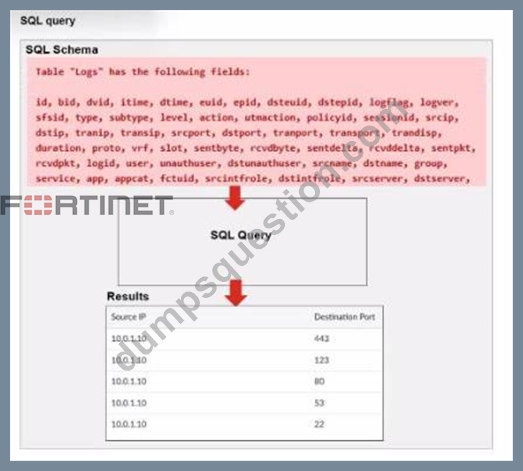
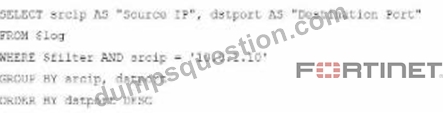
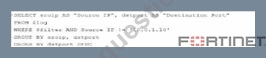
A fortiAnalyzer analyst is customizing a SQL query to use in a report.
Which SQL query should the analyst run to get the expected results?
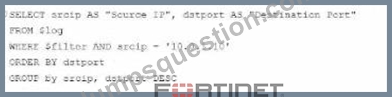
- A.
- B.
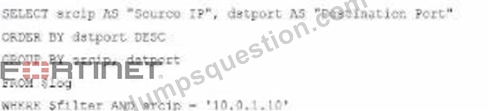
- C.
- D.
Answer: A
Explanation:
The requirement here is to construct a SQL query that retrieves logs with specific fields, namely "Source IP" and "Destination Port," for entries where the source IP address matches 10.0.1.10. The correct syntax is essential for selecting, filtering, ordering, and grouping the results as shown in the expected outcome.
Analysis of the Options:
* Option A Explanation:
* SELECT srcip AS "Source IP", dstport AS "Destination Port": This syntax selects srcip and dstport, renaming them to "Source IP" and "Destination Port" respectively in the output.
* FROM $log: Specifies the log table as the data source.
* WHERE $filter AND srcip = '10.0.1.10': This line filters logs to only include entries with srcip equal to 10.0.1.10.
* ORDER BY dstport DESC: Orders the results in descending order by dstport.
* GROUP BY srcip, dstport: Groups results by srcip and dstport, which is valid SQL syntax.
This option meets all the requirements to get the expected results accurately.
* Option B Explanation:
* WHERE $filter AND Source IP != '10.0.1.10': Uses != instead of =. This would exclude logs from the specified IP 10.0.1.10, which is contrary to the expected result.
* Option C Explanation:
* The ORDER BY clause appears before the FROM clause, which is incorrect syntax. SQL requires the FROM clause to follow the SELECT clause directly.
* Option D Explanation:
* The GROUP BY clause should follow the FROM clause. However, here, it's located after WHERE, making it syntactically incorrect.
Conclusion:
* Correct Answer:A. Option A
* This option aligns perfectly with standard SQL syntax and filters correctly for srcip = '10.0.1.10', while ordering and grouping as required.
References:
* FortiAnalyzer 7.4.1 SQL query capabilities and syntax for report customization.
NEW QUESTION # 14
For which two purposes would you use the command set log checksum? (Choose two.)
- A. To help protect against man-in-the-middle attacks during log upload from FortiAnalyzer to an SFTP server
- B. To encrypt log communications
- C. To prevent log modification or tampering
- D. To send an identical set of logs to a second logging server
Answer: A,C
NEW QUESTION # 15
Which two items are downloaded automatically by the Outbreak Detection Service? (Choose two.)
- A. Incident template
- B. Event Handler
- C. Report Template
- D. Customized playbook
Answer: B,C
NEW QUESTION # 16
For proper log correlation between the logging devices and FortiAnalyzer, FortiAnalyzer and all registered devices should:
- A. Use real-time forwarding
- B. Use DNS
- C. Use an NTP server
- D. Use host name resolution
Answer: C
NEW QUESTION # 17
Why must you wait for several minutes before you run a playbook that you just created?
- A. FortiAnalyzer needs that time to back up the current playbooks.
- B. FortiAnalyzer needs that time to debug the new playbook.
- C. FortiAnalyzer needs that time to parse the new playbook.
- D. FortiAnalyzer needs that time to ensure there are no other playbooks running.
Answer: C
Explanation:
When a new playbook is created on FortiAnalyzer, the system requires some time to parse and validate the playbook before it can be executed. Parsing involves checking the playbook's structure, ensuring that all syntax and logic are correct, and preparing the playbook for execution within FortiAnalyzer's automation engine. This initial parsing step is necessary for FortiAnalyzer to load the playbook into its operational environment correctly.
Here's why the other options are incorrect:
Option A: FortiAnalyzer needs that time to parse the new playbook
This is correct. The delay is due to the parsing and setup process required to prepare the new playbook for execution. FortiAnalyzer's automation engine checks for any issues or dependencies within the playbook, ensuring that it can run without errors.
Option B: FortiAnalyzer needs that time to debug the new playbook
This is incorrect. Debugging is not an automatic process that FortiAnalyzer undertakes after playbook creation. Debugging, if necessary, is a manual task performed by the administrator if there are issues with the playbook execution.
Option C: FortiAnalyzer needs that time to back up the current playbooks This is incorrect. FortiAnalyzer does not automatically back up playbooks every time a new one is created. Backups of configuration and playbooks are typically scheduled as part of routine maintenance and are not triggered by playbook creation.
Option D: FortiAnalyzer needs that time to ensure there are no other playbooks running This is incorrect. FortiAnalyzer can manage multiple playbooks running simultaneously, so it does not require waiting for other playbooks to finish before initiating a new one. The waiting time specifically relates to the parsing process of the newly created playbook.
NEW QUESTION # 18
What is the purpose of playbook trigger variables?
- A. To display statistics about the playbook runtime
- B. To store the start the times of playbooks with On_Schedule triggers
- C. To provide the trigger information to make the playbook start running
- D. To use information from the trigger to filter the action in a task
Answer: A
NEW QUESTION # 19
Exhibit.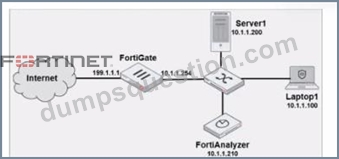
Laptop1 is used by severaladministratorsto manage FotiAnalyzer. You want to configure a generic text filter that matches all login attempts to the web interface generated by any user other than admin'', and coming from Laptop1.
Which filter will achieve the desired result?
- A. Operation-login and srcip== 10.1.1.100 and dstip==10.1.1.1.210 and user==admin
- B. Operation-login and performed_on==''GU(10.1.1.120)' and user!=admin
- C. Operation-login and dstip==10.1.1.210 and user!-admin
- D. Operation-login and performed_on==''GUI(10.1.1.100)' and user!=admin
Answer: D
Explanation:
The objective is to create a filter that identifies all login attempts to the FortiAnalyzer web interface (GUI) coming fromLaptop1(IP 10.1.1.100) and excludes the admin user. This filter should match any user other than admin.
* Filter Components Analysis:
* Operation-login: This portion of the filter will target login actions specifically, which is correct for filtering login attempts.
* performed_on==''GUI(10.1.1.100)': This indicates that the login attempt must occur on the GUI interface and originate from the specified IP, which matches Laptop1's IP address (10.1.1.100). This ensures that the filter only matches GUI logins from this specific device.
* user!=admin: This part excludes logins by the admin user, meeting the requirement to capture only non-admin users.
* Option Analysis:
* Option A: Correctly specifies theOperation-login,performed_on==''GUI(10.1.1.100)', and user!=admin. This setup effectively filters login attempts to the GUI from Laptop1, excluding the admin user.
* Option B: Uses the incorrect IP 10.1.1.120 in the performed_on filter, which does not match Laptop1's IP (10.1.1.100).
* Option C: This option includessrcip==10.1.1.100anddstip==10.1.1.210but incorrectly specifies user==admininstead ofuser!=admin, which does not match the requirement to exclude admin users.
* Option D: This option does not specify theperformed_onfield to restrict it to the GUI and only includesdstip(destination IP) withoutsrcip. It also incorrectly uses user!-admin instead of the correct syntaxuser!=admin.
Conclusion:
* Correct Answer:A. Operation-login and performed_on==''GUI(10.1.1.100)' and user!=admin
* This filter precisely captures the required conditions: login attempts from Laptop1 to the GUI interface by any user except admin.
References:
* FortiAnalyzer 7.4.1 documentation on log filters, syntax for login operations, and GUI login tracking.
NEW QUESTION # 20
An administrator wants to configure timeouts for users. Regardless of the user's behavior, the timer should start as soon as the user authenticates and expire after the configured value.
Which timeout option should be configured on FortiGate?
- A. auth-on-demand
- B. idle-timeout
- C. hard-timeout
- D. new-session
- E. soft-timeout
Answer: C
NEW QUESTION # 21
An administrator has configured the following settings:
config system fortiview settings
set resolve-ip enable
end
What is the significance of executing this command?
- A. It resolves the destination IP address to a hostname in FortiView on FortiAnalyzer.
- B. It resolves the source and destination IP addresses to a hostname in FortiView on FortiAnalyzer.
- C. You must configure local DNS servers on FortiGate for this command to resolve IP addresses on Forti Analyzer.
- D. Use this command only if the source IP addresses are not resolved on FortiGate.
Answer: A
NEW QUESTION # 22
You need to move reports between two ADOMs.
Which two statements are true? (Choose two.)
- A. You need to convert the reports into templates first.
- B. The data and time will be appointed to the original report name to avoid conflicts.
- C. All charts and datasets associated with the report will be imported together.
- D. The ADOMs must be compatible types.
Answer: C,D
NEW QUESTION # 23
Which statement about the FortiSOAR management extension is correct?
- A. It runs as a docker container on FortiAnalyzer
- B. It requires a dedicated FortiSOAR device or VM.
- C. It requires a FortiManager configured to manage FortiGate
- D. It does not include a limited trial by default.
Answer: A
NEW QUESTION # 24
What is required to authorize a FortiGate on FortiAnalyzer using Fabric authorization?
- A. The FortiGate serial number
- B. A FortiGate ADOM
- C. A pre-shared key
- D. Valid FortiAnalyzer credentials
Answer: D
NEW QUESTION # 25
Which statement about sending notifications with incident updates is true?
- A. Each connector used can have different notification settings.
- B. Notifications can be sent only when an incident is created or deleted.
- C. You must configure an output profile to send notifications by email.
- D. Each incident can send notifications to a single external platform.
Answer: A
NEW QUESTION # 26
Exhibit.
What can you conclude about the output?
- A. The output is ADOM specific
- B. Both messages and logs are almost finished indexing.
- C. There are more traffic logs than event logs.
- D. The message rate being lower that the log rate is normal.
Answer: D
Explanation:
In this output, we see two diagnostic commands executed on a FortiAnalyzer device:
* diagnose fortilogd lograte: This command shows the rate at which logs are being processed by the FortiAnalyzer in terms of log entries per second.
* diagnose fortilogd msgrate: This command displays the message rate, or the rate at which individual messages are being processed.
The values provided in the exhibit output show:
* Log rate (lograte): Consistently high, showing values such as 70.0, 132.1, and 133.3 logs per second over different time intervals.
* Message rate (msgrate): Lower values, around 1.4 to 1.6 messages per second.
Explanation:
* Interpretation of log rate vs. message rate: In FortiAnalyzer, the log rate typically refers to the rate of logs being stored or indexed, while the message rate refers to individual messages within these logs.
Given that a single log entry can contain multiple messages, it's common to see a lower message rate relative to the log rate.
* Understanding normal operation: In this case, the message rate being lower than the log rate is expected and typical behavior. This discrepancy can arise because each log entry may bundle multiple related messages, reducing the message rate relative to the log rate.
Conclusion
* Correct Answer:A. The message rate being lower than the log rate is normal.
* This aligns with the normal operational behavior of FortiAnalyzer in processing logs and messages.
There is no indication that both logs and messages are nearly finished indexing, as that would typically show diminishing rates toward zero, which is not the case here. Additionally, there's no information in this output about specific ADOMs or a comparison between traffic logs and event logs. Thus, options B, C, and D are incorrect.
References:
* FortiOS 7.4.1 and FortiAnalyzer 7.4.1 command guides for diagnose fortilogd lograte and diagnose fortilogd msgrate.
NEW QUESTION # 27
Which two constraints can impact the amount of reserved disk space required by FortiAnalyzer?
(Choose two.)
- A. Disk size
- B. License type
- C. RAID level
- D. Total quota
Answer: A,C
NEW QUESTION # 28
Which two statements are correct regarding the export and import of playbooks? (Choose two.)
- A. You can import a playbook even if there is another one with the same name in the destination.
- B. A playbook that was disabled when it was exported, will be disabled when it is imported.
- C. You can export only one playbook at a time.
- D. Playbooks can be exported and imported only within the same FortiAnalyzer.
Answer: A,B
NEW QUESTION # 29
......
Free FCP_FAZ_AN-7.4 Exam Files Downloaded Instantly 100% Dumps & Practice Exam: https://www.dumpsquestion.com/FCP_FAZ_AN-7.4-exam-dumps-collection.html
Updated Verified FCP_FAZ_AN-7.4 dumps Q&As - 100% Pass Guaranteed: https://drive.google.com/open?id=1GupaoCS2KApkRUKOwOZrtPaczH4qyX3x